The notch
It grows only when it has something to say
Three states, in the order you meet them. Real frames from the app, at its real size.
Nothing is close, so nothing asks for you. A dot and the time left.

Five minutes out it widens to fit the title, the countdown and a join button. It covers nothing and waits for no click.

While the microphone or camera is in use the band goes live: elapsed time, input level, and a way back to the tab.

The panel
Click it open, get the whole day
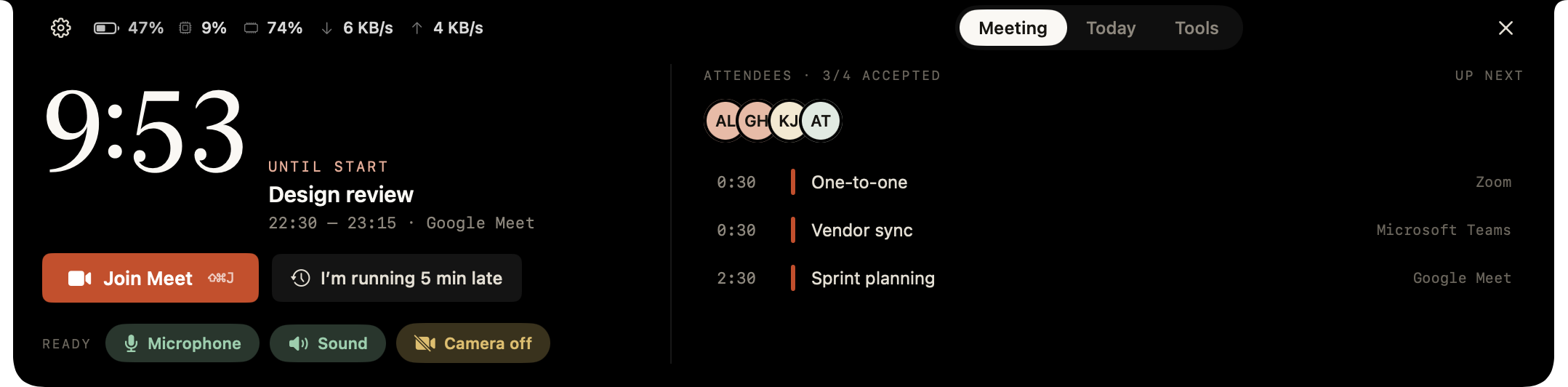
Title, time, provider and the agenda from the invitation. The join button carries the provider's name, because “Join” alone hides which of three apps is about to open.
Freshness
Stale data never quietly looks correct; it says when it last updated.
Conflict
Two meetings at once? The first is not silently picked — you are asked.
Calendars
Apple, Google and Microsoft 365. Tokens stay in your Keychain.
Full-screen alert
Impossible to miss. Still does not steal focus.
It covers the screen, but the cursor stays in your app — keep typing, press Esc to dismiss. While you share your screen or sit on camera it never opens at all.
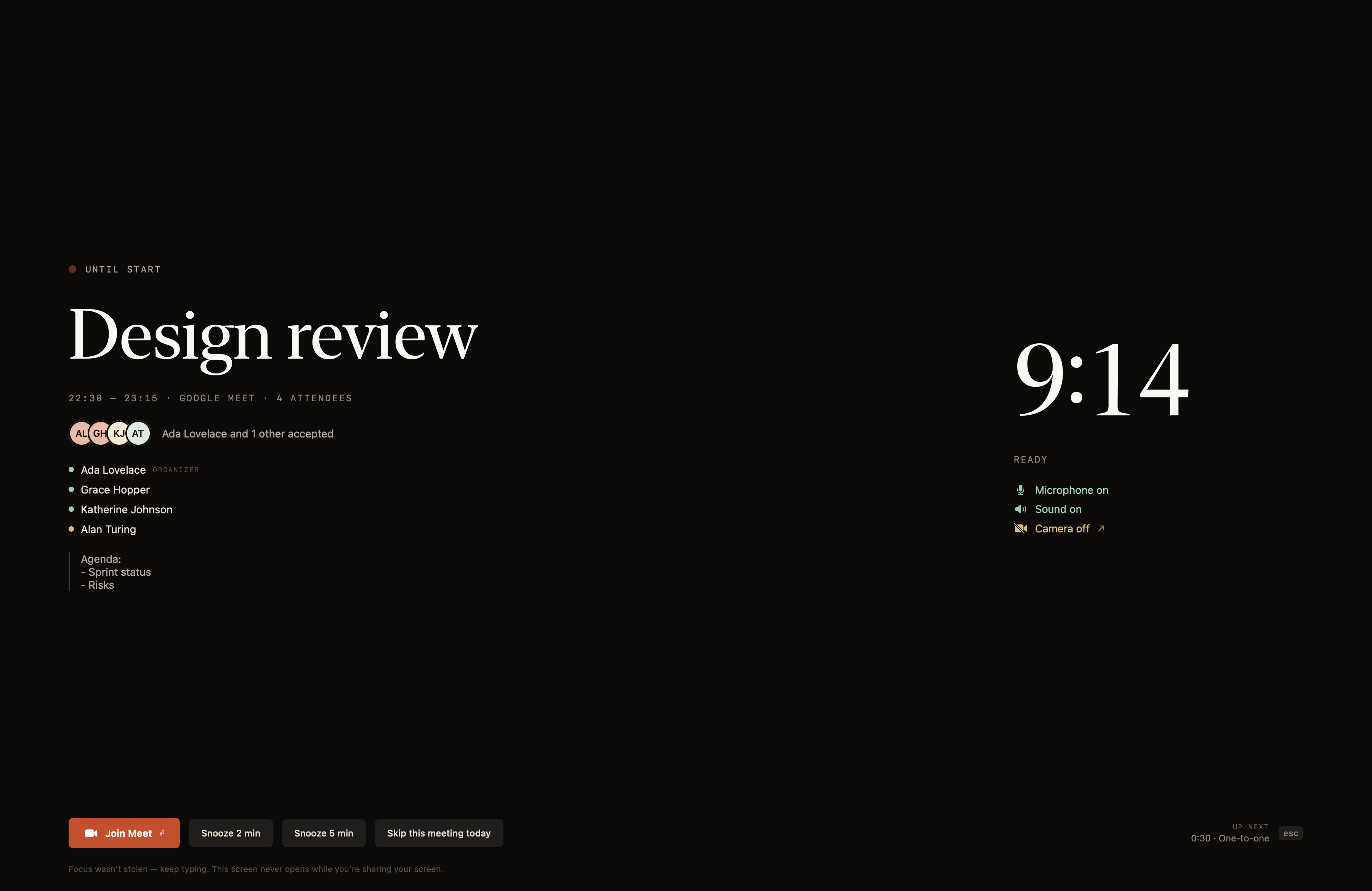
Text cannot be selected — selectable text would open an escape hatch.
The lock-out time is visible: it fills the primary button as it counts.
Transparency lives only in the backdrop; text is always fully opaque.
Another app in full screen is never knocked out of its space.
Tools · thirteen
The notch was already there
Every tool switches off on its own, and a switched-off module costs nothing to run.
Timer and Pomodoro
25/5 · 50/10 · 90/20, automatic breaks and a streak that survives restarts.
No permission needed
Clipboard
Searchable history, a pinboard for what you keep, and a stack that pastes in order.
Only ordered pasting asks for Accessibility
Shelf
Files you drag in wait in the notch; drag them back out together, or delete them.
Dragging a file opens the panel
Screenshot
Area, a single window or the whole screen — space cycles between them. What you capture appears in a corner card you can drag out, annotate or throw away, and stays in a searchable history.
⌥⌘3 · ⌥⌘4 · ⌥⌘5 · Screen Recording asked on first use
Window layout
Six regions, by shortcut. Splitting the screen before a call is one keystroke.
Edge dragging is off by default
System monitor
Processor, memory, disk, network and battery — in the strip the moment you open the notch. Click it for graphs and the apps eating the most.
No measurement asks for permission
Also included
Worth saying what is not here: reading other apps' notifications, song lyrics and Finder's copy progress are not possible on macOS. That is why they are missing.
Setup
Two minutes, no account
Download and drag
Drop it in Applications. Signed and notarized, so no “unidentified developer” warning.
Pick your calendars
One screen. Add a Google or Microsoft account if you want to.
It settles into the notch
The countdown starts at once. Tools are off until you turn them on.
Shortcuts need no Accessibility permission.
Privacy
Your calendar never leaves this Mac.
Vakur reads your calendar on this computer only. Connect Google or Microsoft and the tokens stay in your Keychain — requests go straight from your Mac, with no server in between.
It asks for no screen recording permission: to stay quiet on camera it reads macOS's own in-use indicator, not your screen. No bot, no audio, no summaries.
What is counted: which features get used, as anonymous counts — never meeting titles, attendees, times or file names. There is no account, so nothing ties back to a person, and Settings → About switches it off entirely. This page counts visits the same way and writes no cookie until you say yes.
Download, pick your calendar, done.
First run is a single screen. Everything else stays off until you turn it on.
Frequently asked
What people ask first
→Does it join meetings as a bot?
No. It does not enter the meeting, record anything, write summaries or email anyone. Its whole job is to read the calendar, find the right link and speak up on time.
→Which calendars does it read?
Apple Calendar locally through EventKit; Google Calendar and Microsoft 365 directly over OAuth/PKCE. You choose which calendars count.
→What about a Mac without a notch?
The same surface appears as a pill above the screen. The menu bar and alert are unchanged, and you can turn the notch surface off entirely.
→Which permissions does it ask for?
Calendar is the only required one. The rest are per-tool and asked on first use: Screen Recording for screenshots, Microphone for dictation, Accessibility for window layout. A permission you withhold limits only that tool.
→Will the alert appear while I present?
It will not. It is suppressed while you share your screen or sit on camera, independently of Do Not Disturb. Even when open, your focus does not move.
→In which languages does it run?
English and Turkish. It follows your Mac's language; any other language falls back to English.
→Will it become paid?
This version is free. If a paid tier ever arrives, the version you download today will not stop working; promising more than that would not be honest.
Release notes
What changed
Updates arrive signed, over Sparkle. The automatic check can be switched off.
- Accessibility permission granted after launch is now noticed straight away. The media-keys warning used to stay until you quit and reopened Vakur — and clicking it sent you to a panel where you had already granted it.
- Nothing sits under the hardware notch any more: the live meeting band grows with its controls, and the panel's status strip stops where the notch begins.
- Staying awake says what it is really doing. If the lid-closed guard cannot be installed it says so instead of showing a tick, changing an option no longer restarts the clock, and an open session is visible in the menu bar.
- The meeting light is off until you turn it on. It used to light the edges of the screen by itself the moment the camera opened.
- A meeting you wrote into your own calendar, with nobody else invited, now shows up in the list and in the notch.
- Vakur now runs on macOS 15 Sequoia and later, not only on macOS 26.
- Screenshot and screen recording: an area, one window or the whole screen; a card you can drag out or annotate, and video or GIF with the elapsed time in the notch.
- Meeting light: the edge of the screen lights up when the camera opens, and one tap puts it out.
- Clipboard: ⌘⇧V opens it, arrows walk it, and the text inside copied images is searchable. It can sync over iCloud.
- Settings moved into a sidebar and now speaks the notch's language.
- Staying awake with the lid closed, through a privileged helper that carries a heartbeat.
- The disk card shows what is reading and writing right now, and the biggest files.
- The Notifications tile records Vakur's own alerts: the system banner disappears, the history does not.
- The download band grows with the file name, and the name no longer slides under the notch.
- Dictation still needs macOS 26 — on-device transcription arrived with it. On Sequoia the tool is simply not shown.